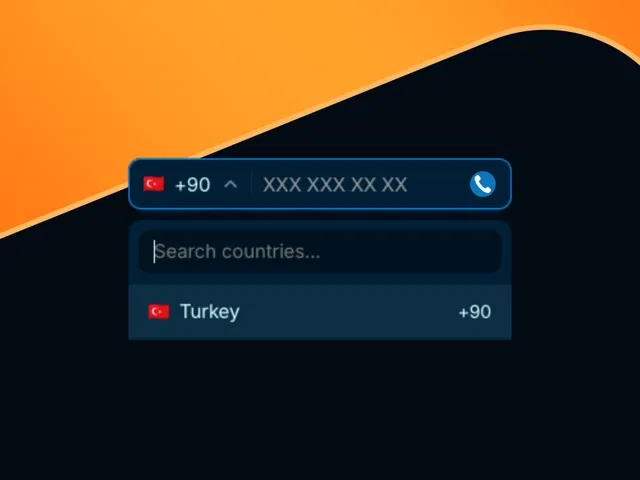
Pre-built Pixcodrops components for country selector, flag icons, and phone code display
Dropdown with searchable country list, flag thumbnails, and automatic dial code insertion
Real-time phone field formatting and validation (with/without country code)
Seamless integration into Framer Form Builder or custom forms
Responsive, accessible styling that matches your brand (typography, colors, spacing)
Narrated video demo with live canvas setup, component import, and form binding
#What is This Course?
"Phone in Form Fields" is a free video tutorial on the Framer Marketplace, created by a featured designer/developer (likely tied to Pixcodrops components). This framer resource practical video shows how to enhance Framer forms with professional international phone inputs using ready-made components from pixcodrops.com. Through narrated screen recordings with live building, zooms on component properties, form integration, and real-time testing, it covers importing Pixcodrops assets, setting up the country selector + flag dropdown, linking dial codes to phone fields, adding validation, and styling for brand consistency. Video length is likely 10–20 minutes (typical for Marketplace form/UI tutorials), with pause-friendly pacing for following along. It assumes you have Framer Form Builder or a basic form setup and highlights Pixcodrops' high-quality, reusable components. No duplicatable project is explicitly noted in listings, but the tutorial is designed for direct implementation in your own Framer forms. It's especially valuable for designer-developers building global-facing sites—making phone fields accurate, user-friendly, and visually polished without reinventing the wheel.
#What You’ll Learn ⚡
Importing and configuring Pixcodrops country selector + flag components from the Marketplace
Setting up a searchable dropdown that displays country flags and inserts corresponding dial codes
Linking the selected country code to a phone input field for automatic prefixing
Adding client-side validation (format, required, country-specific rules) and error states
Styling the entire phone field group (dropdown + input) to match your site’s design system
#Who Is This For?
This video tutorial is ideal for Framer users creating forms for international audiences—perfect if your phone fields feel basic or you're losing leads from poor country code handling.
Skill Level: Intermediate—assumes comfort with Framer forms and components
Prior Knowledge Needed: Basic Framer Form Builder or form setup, components/variants
Use Case 1: Contact, sign-up, booking, or checkout forms targeting global users
Use Case 2: Adding professional phone inputs to templates or client projects
Pain Point Solved: Generic phone fields causing input errors—add smart country/flag selector
Pain Point Solved: Manual dial code entry—auto-populate with flags for better UX
Bonus Fit: Designers building e-commerce, SaaS, agencies, or multilingual sites
#Course Structure Breakdown
This video tutorial flows as a live, narrated build-along—screen recording with canvas zooms, component properties panel focus, form binding, and real-time testing for easy pausing/replication.
Intro / Recap / Problem Statement: Opens with why international phone fields matter (global reach, fewer errors), introduces Pixcodrops components, outlines the build goal
Main Demo Sections: Install/import Pixcodrops country selector + flag assets, place in form layout
Key Live Examples or Walkthroughs: Configure dropdown (searchable list, flag display), link dial code to phone input, add validation/error states
Tips / Best Practices: Style for brand match (colors, typography, spacing), ensure mobile responsiveness, test with different countries, handle empty/default states
Wrap-up / Encouragement: Shows final phone field working in a form (flag + code + input), highlights UX/conversion wins, and encourages applying to your own forms
Frequently Asked Questions
Where do the country/flag components come from?
Pixcodrops.com—high-quality, Marketplace-available components designed specifically for Framer; tutorial shows how to add/install them.
Do I need a paid Framer plan or external service?
No—works on any plan; Pixcodrops components are free to use in your projects (check creator license).
Can I customize the country list or add search?
Yes—components typically include searchable dropdowns; video covers configuration options for filtering or custom lists.
Phone in Form Fields
Make your Framer forms truly global-ready
Resource Types :
Featured Framer Resources
Add Featured Product



Have a product?
Submit your Framer product to AllFramer, get featured, and drive genuine traffic while showcasing your work to the world. Turn your creativity into revenue and begin selling today! 🚀
Submit Resource





