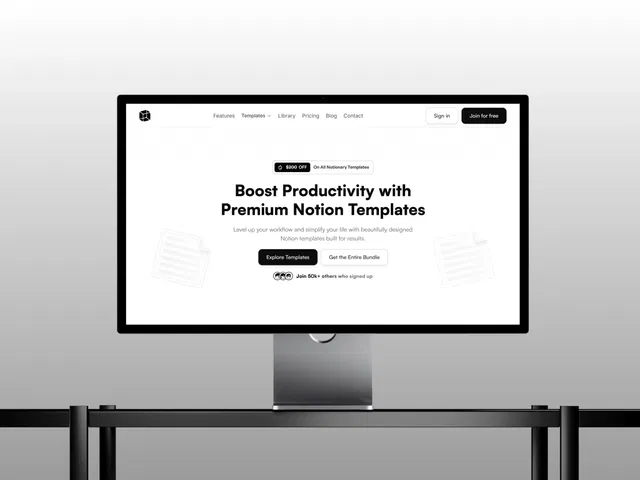
Beginner-friendly guide to a specific e-commerce template for Notion creators
Highlights CMS power: easy product management, filtering, dynamic pages
Fully no-code — remix, customize, publish in minutes
Responsive design out of the box for desktop/mobile sales
Focus on digital product sales (Notion templates, but adaptable)
Includes practical steps with likely screenshots or visual references
Ties into Framer Marketplace ecosystem: easy access via remix
#What is This Video Course?
"Notionary Template" is a free beginner guide tutorial (likely text-based with possible embedded visuals or short video elements) created by Dragframe on the Framer resource. This concise guide introduces and explains the Notionary template — a responsive e-commerce site designed specifically for creators and businesses to sell Notion templates with ease. It covers the template's key features, how to use and customize it, and practical steps for getting started. The tutorial emphasizes simplicity for beginners, focusing on CMS setup, product filtering, dynamic pages, and overall configuration in Framer. While not explicitly a long video, Marketplace tutorials in this category often include demo screenshots, step-by-step instructions, and a duplicatable template/project link for hands-on remixing. The core purpose: help users quickly launch and customize a professional Notion template storefront using Framer's no-code tools.
#What You’ll Learn ⚡
Overview of the Notionary template: its purpose as a responsive e-commerce solution for selling Notion templates
Key features: fully customizable CMS for products, advanced filtering (categories, tags, search), dynamic product detail pages
How to remix and open the template in your Framer workspace
Setting up and managing the CMS: adding/editing Notion template products, configuring fields (title, description, price, preview images, download links)
Customizing the storefront: changing colors, typography, layouts, hero sections, and navigation while keeping responsiveness
Using product filters and search: how CMS-powered filtering works for categories/tags, and displaying results dynamically
Creating dynamic product pages: auto-populated details, buy/download buttons, previews, and related items
Publishing and basic monetization tips: going live with a free Framer domain and preparing for sales (e.g., Gumroad/Stripe integration if applicable)
#Who Is This For?
Beginners in Framer who want to sell digital products (especially Notion templates) but don't know where to start
Notion creators, template makers, or solopreneurs looking for a ready-made, beautiful storefront without building from scratch
Designers or businesses needing a customizable e-commerce site for digital downloads with CMS for easy updates
Users remixing Framer Marketplace templates and wanting a guided walkthrough of features like CMS filtering and dynamic pages
Anyone inspired by the Notion economy who wants a professional-looking sales site fast — no advanced coding required
Visual learners or template users who prefer step-by-step guides with screenshots over long videos
#Course Structure Breakdown
Introduction — Welcome and overview: what is Notionary, why it's great for selling Notion templates (responsive, CMS-powered, easy to customize).
Getting Started — Step-by-step: find/remix the template in Marketplace → "Open in Framer" → duplicate to your workspace.
Template Tour — Quick walkthrough of main pages/sections: homepage, product grid, filters, product details, cart/checkout flow (if included).
CMS Setup & Customization — Core focus: access CMS collections → add/edit products (fields like name, price, preview, description, file link) → customize design (colors, fonts, layouts) without breaking functionality.
Advanced Features — How filtering works (categories/tags/search), dynamic pages auto-populate from CMS, responsive behavior across devices.
Publishing & Tips — One-click publish to free domain, basic tips for sales (integrate payment links), and encouragement to personalize further.
Wrap-up — Recap key strengths, call to remix and launch your store, possible links to full Notionary template page or support.
Frequently Asked Questions
Is this a video or text tutorial?
Primarily text-based beginner guide with step-by-step instructions and likely screenshots; Framer Marketplace tutorials in this style are often readable/quick rather than long videos.
Do I need to buy the template?
No — the tutorial is free; the Notionary template itself may be free or paid (check Marketplace page), but the guide helps you use/remix it.
What makes Notionary special?
It's built specifically for selling Notion templates: CMS for easy updates, advanced filters, dynamic product pages, clean e-commerce layout.
Have a product?
Submit your Framer product to AllFramer, get featured, and drive genuine traffic while showcasing your work to the world. Turn your creativity into revenue and begin selling today! 🚀
Submit Resource





