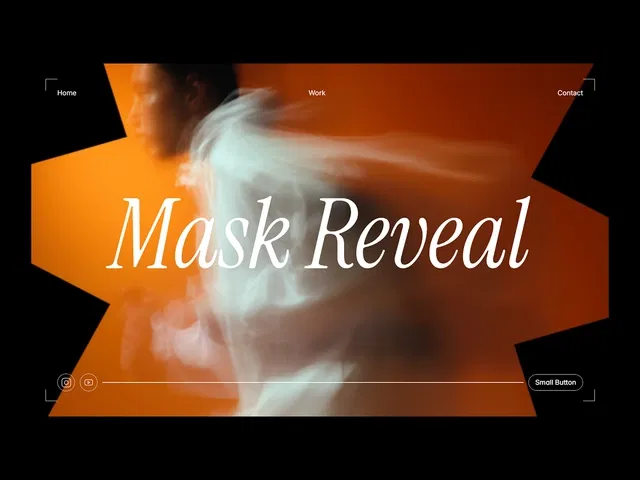
No-code mask reveal using Framer’s native Mask layer and animation tools
Focus on scroll-driven cinematic effects — ideal for storytelling or portfolio intros
Includes duplicatable starter project for immediate hands-on practice
Live demos show every click: mask creation, property animation, scroll offset setup
Emphasizes elegance: smooth timing, subtle motion, high visual impact
Responsive and performant — works beautifully across devices
Part of Nandi’s animation-focused Framer series — consistent high-quality teaching
#What is This Video Course?
"Mask Reveal" is a focused, creative video framer resource created by Nandi on the Framer Marketplace. In this short video (estimated 10–15 minutes based on Nandi's typical style), Nandi demonstrates how to build elegant mask reveal animations in Framer — a popular effect where content (images, text, sections) gradually appears through a moving or expanding mask shape, creating a smooth, cinematic reveal on scroll, hover, or load. The format includes live screen recording inside Framer, clear voiceover, real-time tweaking of settings, and visual previews of the final result. It features an "Open project" link to duplicate a starter project so viewers can follow along, pause, and build the effect themselves. The core goal: teach a stunning, no-code mask reveal technique that adds premium polish to hero sections, portfolios, case studies, or transitions without custom code or external libraries.
#What You’ll Learn ⚡
How to use Framer’s Mask feature to clip and reveal content dynamically
Creating a mask shape (circle, rectangle, custom path) that animates to uncover underlying elements
Setting up scroll-based mask reveals: content appears as users scroll down (e.g., image/text wipe effect)
Combining mask animations with variants, opacity, scale, or position for layered reveals
Adding hover or on-load triggers for interactive mask effects (e.g., button hover expands mask)
Adjusting animation properties live: duration, easing, delay, scroll offsets, and mask path changes
Ensuring responsiveness: making mask reveals adapt smoothly across desktop, tablet, and mobile breakpoints
Best practices for performance and polish: subtle timing, readability through masks, and combining with other effects
#Who Is This For?
Intermediate Framer users who know basics but want to add high-end, cinematic animations to their designs
Designers building portfolios, case studies, hero sections, or storytelling pages needing elegant content reveals
Creators following Nandi’s animation series (e.g., Animate Framer Sites, Beautiful Site BGs) and ready for more advanced visual effects
Anyone remixing templates or starting custom projects who sees static content and wants dynamic, scroll-driven wow moments
Visual learners who prefer watching live mask setup, path editing, and preview results over reading text steps
Framer enthusiasts aiming for Awwwards-level polish without code or plugins
#Course Structure Breakdown
Introduction & Effect Showcase — Quick welcome, explanation of mask reveals (why they feel premium), and live preview of the final effect(s) — scroll/hover/load variations.
Setting Up the Base — Start with duplicatable project or blank canvas; add background image/text/layer to reveal, create mask shape (circle/rect/path).
Mask Basics — Select mask layer → apply Mask to target content → adjust initial mask size/position to hide content completely.
Animation Setup — Open animation panel → choose trigger (scroll position, hover, appear) → animate mask properties (scale, position, path morph) to reveal content.
Scroll-Based Reveal Deep Dive — Most common use: set scroll offset, animate mask expansion on scroll, tweak easing for smooth wipe.
Variations & Polish — Add hover reveal, on-load fade-in, combine with opacity/scale on revealed content, responsive tweaks across breakpoints.
Performance & Tips — Advice on keeping masks light (avoid heavy paths), test mobile, ensure text readability through animation.
Wrap-up & Experimentation — Recap key steps; encourage customizing shapes/triggers; links to more Nandi tutorials or resources.
Frequently Asked Questions
Is this suitable for Framer beginners?
Intermediate recommended — you should know basic layers, components, and animation panel; basics are quickly recapped but assume some familiarity.
How long is the video?
Estimated 10–15 minutes — Nandi’s style is focused and demo-heavy, perfect for quick learning.
Do I need to duplicate a project?
Yes — tutorial provides an "Open project" link so you can follow along, pause, and build the mask reveal live.
Mask Reveal
Perfect for scroll-driven, premium content entrances on any site.
Resource Types :
Have a product?
Submit your Framer product to AllFramer, get featured, and drive genuine traffic while showcasing your work to the world. Turn your creativity into revenue and begin selling today! 🚀
Submit Resource





