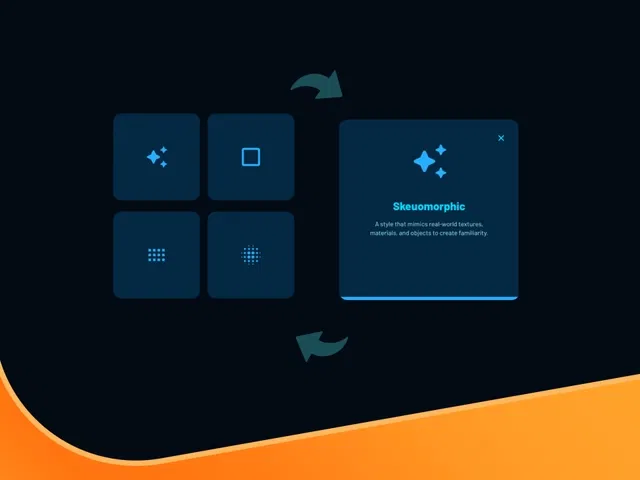
True infinite looping animation of Bento-style grid tiles (automatic cycling)
Smooth tile transitions (fade, slide, scale) with customizable timing and easing
Hover pause (stops autoplay when mouse is over a tile, resumes on leave)
Click interactions (open modal, navigate, or trigger variant/state change per tile)
Responsive grid layout using Stacks/Grids that adapts across breakpoints
Native Framer tools (variants, interactions, scroll/animation timeline, CMS optional) for no-code build
Narrated video with live canvas demo, animation logic explanation, and real-time testing
#What is This Course?
"Looping Bento Grid" is a free video tutorial on the Framer Marketplace, created by a skilled designer/animator (community contributor). This framer resource intermediate-level video dives into the exact logic behind building a clean, autoplaying Bento grid that loops forever while remaining interactive and performant. Through narrated screen recordings with live canvas construction, zooms on variants panel, animation timeline or interactions setup, hover/click triggers, and real-time preview testing, it covers grid structure (Stacks/Grids), tile animation (cycle through items), autoplay timing, hover pause, click behavior, and infinite loop implementation. Video length is likely 12–20 minutes (typical for Marketplace animation/layout tutorials), with pause-friendly pacing for hands-on replication. No duplicatable project is explicitly noted in listings, but the tutorial is designed for direct building in your own Framer canvas or template. It’s especially valuable for designer-developers who want dynamic, low-maintenance grids—adding movement and engagement to feature showcases, portfolios, testimonials, or CMS-driven content without third-party plugins or heavy code.
#What You’ll Learn ⚡
Structuring a Bento-style grid using Stacks and Grids for responsive, uneven layouts
Setting up smooth autoplay animation that cycles tiles (fade/slide/scale) on a loop
Implementing hover pause (stop cycle when mouse over, resume on leave) with interactions
Adding click interactions per tile (open lightbox, navigate to page, change variant)
Creating infinite looping logic without visible jumps or performance issues
Tuning timing, easing curves, and stagger delays for polished, natural motion
#Who Is This For?
This video tutorial is perfect for Framer users who want their grids to feel alive and modern—ideal if your layouts are static or you want to showcase multiple items dynamically.
Skill Level: Intermediate—assumes comfort with Stacks, variants, and interactions
Prior Knowledge Needed: Basic Framer layout (Stacks/Grids), animation timeline or interactions
Use Case 1: Feature sections, portfolio project grids, or testimonial carousels with autoplay
Use Case 2: Blog post previews, team member showcases, or product card rotations
Pain Point Solved: Static grids feel boring—add looping motion and interactivity
Pain Point Solved: Autoplay hard to make seamless—learn clean infinite loop logic
Bonus Fit: Designers building SaaS, agency, or creative sites wanting low-effort engagement
#Course Structure Breakdown
This video tutorial flows as a live, narrated build-along—screen recording with canvas zooms, layout panel focus, animation/variants setup, hover/click triggers, and real-time autoplay testing for easy pausing/replication.
Intro / Recap / Problem Statement: Hooks with the appeal of an autoplaying Bento grid (dynamic, engaging), explains why looping + interactivity feels premium, outlines the final result
Main Demo Sections: Build responsive Bento grid structure (Stacks/Grids with varied tile sizes), design individual tile component
Key Live Examples or Walkthroughs: Set up autoplay cycle (variants or animation timeline), add hover pause (interaction stop/resume), configure click actions (modal, link)
Tips / Best Practices: Use stagger delays for natural flow, tune easing for smoothness, optimize tile content (images/text), ensure mobile responsiveness, test loop seamlessness
Wrap-up / Encouragement: Shows final looping Bento grid in action (autoplay + hover + click), celebrates low-maintenance engagement, and encourages customizing for your content
Frequently Asked Questions
How does the infinite loop work without visible jumps?
Duplicate the grid content and reposition seamlessly—tutorial shows exact duplication + animation reset logic for perfect looping.
Can I use CMS data to populate the grid?
Yes—bind tiles to a CMS collection; video likely covers dynamic content for blog posts or projects.
Does hover pause work on mobile/touch?
Yes—Framer converts hover to touch events; tutorial demonstrates tap-to-pause or long-press alternatives.
Looping Bento Grid
Bring elegant, eye-catching motion to your Framer layouts
Resource Types :
Featured Framer Resources
Add Featured Product



Have a product?
Submit your Framer product to AllFramer, get featured, and drive genuine traffic while showcasing your work to the world. Turn your creativity into revenue and begin selling today! 🚀
Submit Resource





