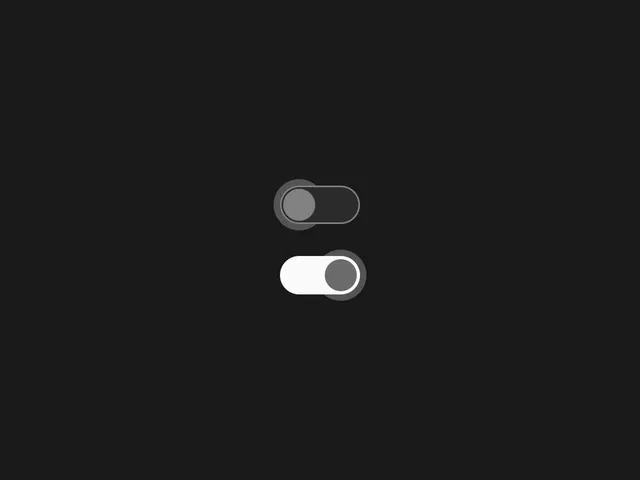
Pixel/Android-inspired design with halo glow effect on active state
Smooth, tuned animations for toggle motion (spring-based transitions)
Variants for on/off states with halo, background, and knob changes
Native Framer tools (variants, interactions, motion properties) for no-code/low-code build
Focus on making it feel "OS-native" through subtle details like easing and timing
Text-based tutorial (with possible embedded video/demo) explaining step-by-step construction
#What is This Course?
"Halo Toggle" is a free tutorial on the Framer Marketplace, created by Omer Mirza (@_omermirza). This framer resource teaches how to recreate a modern toggle switch with the signature halo glow seen in Google Pixel/Android interfaces—emphasizing motion that feels tuned and native. The guide walks through building the component from scratch: setting up variants (on/off), designing the knob/background/halo, applying precise animations (spring easing, timing), and adding interactions for click/tap response. Likely includes narrated screen recording elements or live demos (common in Omer's tutorials), with zooms on properties panel, variants setup, and motion curves. No explicit runtime given, but concise for hands-on building. It includes support contact (X account) and is designed for direct replication in your Framer canvas. It's highly valuable for designer-developers wanting premium, platform-feeling UI controls—elevating settings toggles, mode switches, or checkboxes with subtle polish and familiarity.
#What You’ll Learn ⚡
Designing a toggle component with halo glow effect using layers, opacity, and blur
Setting up on/off variants with background color changes, knob position, and halo scaling/opacity
Applying tuned motion animations (spring physics, custom easing/timing) for natural toggle feel
Adding click interactions to switch states smoothly with haptic-like feedback
Refining details (border radius, shadows, alignment) to achieve "OS-native" premium look
#Who Is This For?
This tutorial is ideal for Framer users crafting high-fidelity UI—perfect if you want toggles that feel like native Android/Pixel controls rather than generic switches.
Skill Level: Beginner to intermediate—great with basic components/variants
Prior Knowledge Needed: Comfort with Framer variants, interactions, and motion properties
Use Case 1: Adding polished mode toggles (dark/light, notifications on/off) to dashboards or settings
Use Case 2: Enhancing templates or apps with platform-inspired interactive elements
Pain Point Solved: Basic toggles look flat—add halo glow and tuned motion for premium feel
Pain Point Solved: Animations feel off—learn precise spring/easing for natural response
Bonus Fit: Designers inspired by mobile OS UI wanting consistent, familiar controls in web projects
#Course Structure Breakdown
This tutorial flows as a practical, step-by-step build guide—likely with screen-recorded demos or detailed canvas instructions, easy to follow while replicating in Framer.
Intro / Recap / Problem Statement: Introduces the Pixel/Android halo toggle aesthetic, explains why motion/details make it feel "native," and outlines the build goal
Main Demo Sections: Setup base component (knob, track, halo layer), create on/off variants (position, color, opacity changes)
Key Live Examples or Walkthroughs: Apply animations (spring transition for knob/halo), add click interaction to toggle states, refine timing/easing for smoothness
Tips / Best Practices: Tune spring parameters (damping/stiffness), use blur for glow, ensure accessibility (contrast, tap targets), test on devices
Wrap-up / Encouragement: Shows final halo toggle in action (on/off with glow), highlights OS-native feel, and invites questions/support via X
Frequently Asked Questions
What makes the halo toggle "Pixel-inspired"?
Signature glow ring (halo) that scales/opacifies on active state, combined with smooth spring motion—tutorial recreates the Android 16/Pixel UI language feel.
Do I need code overrides for the halo effect?
Likely minimal—uses native layers (blur/opacity), variants, and interactions; guide keeps it accessible with Framer tools.
How do I tune the motion to feel natural?
Adjust spring damping/stiffness in transition settings—tutorial demos values for "tuned" feel (bouncy but not excessive).
Halo Toggle
Craft a sleek, OS toggle switch inspired by Google Pixel/Android UI
Resource Types :
Featured Framer Resources
Add Featured Product



Have a product?
Submit your Framer product to AllFramer, get featured, and drive genuine traffic while showcasing your work to the world. Turn your creativity into revenue and begin selling today! 🚀
Submit Resource





