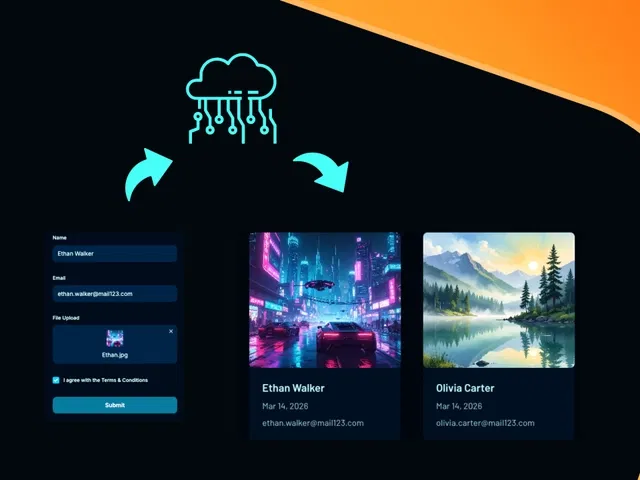
Live screen-recorded demo of building the full component from scratch
Real-time preview generation for images (thumbnails) and other files (icons, names, sizes)
Variant-based state handling (idle → uploading → preview → success/error)
File type/size validation with clear user messages
Integration into Framer forms or custom submission setups
Narrated walkthrough with canvas zooms, property panel focus, and interaction setup
#What is This Course?
"File Upload & Display" is a free video tutorial on the Framer Marketplace, created by Akın Gündoğan (@akn-gundogan). This framer resource hands-on video course teaches how to build a complete file upload experience with previews and states—going beyond Framer's basic file input by adding visual feedback, progress, and polish. Delivered through narrated screen recordings with live canvas building, zooms on key panels, and step-by-step interaction/variant setup, it covers file selection, preview logic, state management, validation, and form integration. Likely 10–20 minutes long (typical for Marketplace video tutorials), it includes practical examples and tips for clean UX. No explicit duplicatable project is mentioned in listings, but the video is designed for pausing and replicating directly in your Framer canvas. It's especially valuable for designer-developers creating application forms or content uploads—making the process trustworthy and modern while staying mostly no-code.
#What You’ll Learn ⚡
Building a custom file input component with click and drag-and-drop support using Framer's file element
Implementing real-time file previews (image thumbnails via object URLs, file metadata display for non-images)
Creating and switching between variants for every upload state (idle, uploading with progress, preview, error, success)
Adding client-side file validation (allowed types, max size) and showing friendly error/success feedback
Integrating the upload/display component into Framer forms or linking it to custom submission actions
#Who Is This For?
This video tutorial is tailored for Framer users ready to level up forms with file handling—perfect if native inputs feel too plain or you want previews to build user confidence.
Skill Level: Intermediate—assumes familiarity with components, variants, and interactions
Prior Knowledge Needed: Basic Framer forms, variants panel, interactions; comfort pausing video to build along
Use Case 1: Job application or portfolio submission forms with resume/image preview
Use Case 2: Support/contact forms requiring screenshots, documents, or proof uploads
Pain Point Solved: No visual feedback on upload—add instant previews and state indicators
Pain Point Solved: Basic file inputs look generic—create branded, interactive upload flows
Bonus Fit: Designers building client-facing or interactive sites who want forms to feel premium
#Course Structure Breakdown
This video tutorial flows as a live, demo-driven walkthrough—narrated screen recording with smooth zooms, real-time building, and pause-friendly pacing for replication.
Intro / Recap / Problem Statement: Opens with why file previews/states matter (UX trust, reduced errors), notes native Framer gaps, outlines what you'll build
Main Demo Sections: Setup file input element, handle file change events, generate previews (object URLs for images)
Key Live Examples or Walkthroughs: Build variants for states (uploading spinner, preview thumbnail, error message), add validation logic, show conditional display
Tips / Best Practices: Optimize for performance (limit file size), use interactions for smooth transitions, test file types/devices, integrate with form submit
Wrap-up / Encouragement: Shows final component working end-to-end in a form, highlights user experience wins, and encourages customizing for your projects
Frequently Asked Questions
Why not just use Framer's native file input?
Native input lacks preview, progress, validation, and styling—this video builds a custom version with all those for a modern feel.
Can I preview PDFs or other non-image files?
Yes—display file icon + name/size; tutorial shows conditional logic to handle different types.
Do I need code overrides to make this work?
Some light code (e.g., URL.createObjectURL for previews) is likely used—video explains it clearly and keeps it minimal.
File Upload&Display
Turn static forms into dynamic, user-friendly experiences
Resource Types :
Featured Framer Resources
Add Featured Product



Have a product?
Submit your Framer product to AllFramer, get featured, and drive genuine traffic while showcasing your work to the world. Turn your creativity into revenue and begin selling today! 🚀
Submit Resource





