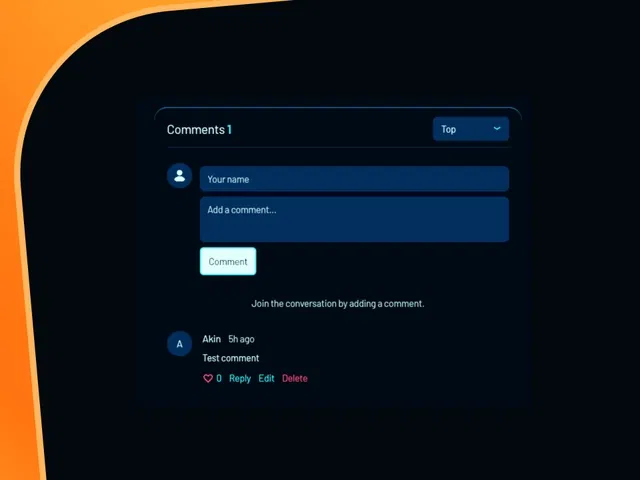
Seamless integration of ReplyFrame component into Framer CMS blog posts
Threaded comment system with nested replies and reply-to functionality
Real-time interactions (likes, comment submission, moderation tools)
Dynamic loading tied to CMS items (each blog post gets its own comment thread)
Customizable styling to match your site's design (variants, colors, typography)
Narrated video demo with live canvas setup, CMS binding, and ReplyFrame configuration
#What is This Course?
"Dynamic Comments" is a free video tutorial on the Framer Marketplace, created by a talented designer/builder/developer Isaiah Kakitahi (featured/built ReplyFrame). This framer resource hands-on video teaches how to transform static Framer CMS blogs into interactive discussion hubs by embedding and configuring the ReplyFrame component. Delivered through narrated screen recordings with live building, zooms on CMS binding, component properties, and interaction setup, it covers adding ReplyFrame to blog templates, linking threads to CMS items (post ID), styling for brand match, and enabling features like replies/likes/moderation. Video length is likely 10–20 minutes (typical for Marketplace component tutorials), with pause-friendly pacing for following along. It assumes you have a Framer CMS blog setup and highlights ReplyFrame's power for dynamic, community-driven content. No duplicatable project is explicitly noted in listings, but the tutorial is designed for direct implementation in your own CMS-powered blog. It's invaluable for bloggers, content creators, or agencies who want reader engagement—turning one-way posts into conversations while leveraging Framer's native CMS.
#What You’ll Learn ⚡
Installing and adding the ReplyFrame component to your Framer CMS blog template
Binding ReplyFrame threads dynamically to individual CMS blog posts (using post ID or slug)
Configuring core features (threaded replies, likes, moderation, user display) via component properties
Customizing ReplyFrame appearance (colors, typography, layout, avatars) to match your brand
Testing comment submission, real-time updates, and interaction states in preview and live
#Who Is This For?
This video tutorial is ideal for Framer users with CMS blogs who want to foster community—perfect if your posts feel static or you're missing reader interaction.
Skill Level: Intermediate—assumes comfort with Framer CMS and components
Prior Knowledge Needed: Working Framer CMS blog setup (collections, dynamic pages), basic component/variant knowledge
Use Case 1: Adding comment sections to personal/professional blogs for discussion and feedback
Use Case 2: Building community-driven content sites, tutorials, or portfolios with reader engagement
Pain Point Solved: No native dynamic comments in Framer—use ReplyFrame for threaded, real-time interaction
Pain Point Solved: Generic comment embeds—customize ReplyFrame to feel native and on-brand
Bonus Fit: Content creators or agencies wanting to boost time-on-site and reader loyalty
#Course Structure Breakdown
This video tutorial flows as a live, narrated build-along—screen recording with canvas zooms, CMS panel focus, ReplyFrame properties walkthrough, and real-time testing for easy pausing/replication.
Intro / Recap / Problem Statement: Opens with why dynamic comments matter (engagement, community), introduces ReplyFrame by Isaiah Kakitahi, and outlines the CMS blog integration goal
Main Demo Sections: Install ReplyFrame from Marketplace, add to blog post template, bind to CMS item (post ID/slug field)
Key Live Examples or Walkthroughs: Configure features (threaded replies, likes, moderation), customize styling (variants/colors/layout), test submission and display
Tips / Best Practices: Use CMS fields for user data, moderate via ReplyFrame dashboard, optimize for mobile, handle empty states gracefully
Wrap-up / Encouragement: Shows final dynamic comments working on a live blog post, highlights community-building wins, and encourages applying to your own CMS content
Frequently Asked Questions
What is ReplyFrame and why use it for comments?
ReplyFrame is a powerful third-party component (by Isaiah Kakitahi) built for Framer—offers threaded replies, likes, moderation, and real-time updates natively integrated with CMS.
Do I need a paid plan or external service for ReplyFrame?
ReplyFrame is free to add from Marketplace; some advanced features may require ReplyFrame account (check creator docs)—tutorial covers basic setup.
How does it connect to my CMS blog posts?
Bind the component to a CMS field (e.g., post slug/ID)—each post gets its own comment thread automatically.
Dynamic Comments
Add engaging, real-time comment functionality to your Framer CMS blog
Resource Types :
Featured Framer Resources
Add Featured Product



Have a product?
Submit your Framer product to AllFramer, get featured, and drive genuine traffic while showcasing your work to the world. Turn your creativity into revenue and begin selling today! 🚀
Submit Resource





