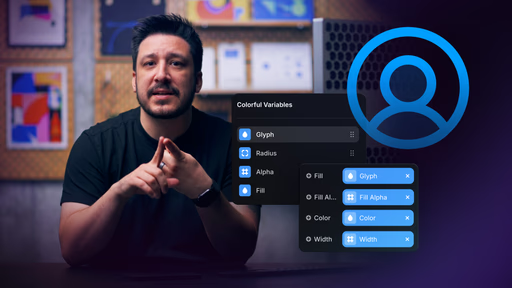
Short 6:58 lesson — quick, actionable win for vector customization
100% no-code — uses Framer's native variables bound to vector properties (fill, stroke, scale, etc.)
Focus on reuse & scalability: one vector → many appearances without copying/duplicating
Key workflow: define variables → bind to paths/sets → test across states/layouts
Improves UX/performance: cleaner code, fewer manual tweaks, consistent design
Part of "Mastering Vectors in Framer" course (Lesson 4, following Drawing, Sets)
Ideal for icons/logos/UI elements needing theme/hover/brand adaptability
#What is This Video Course?
"Customizing Vectors with Variables in Framer" is a concise, actionable lesson crafted by the Framer team as part of the Mastering Vectors in Framer course series, clocking in at just 4:59 for efficient learning on the go. Released on February 19, 2026—still fresh as of today's March 05, 2026 vibe—this framer resource zeroes in on empowering designers to make vectors adaptable powerhouses using Framer's variable system, tackling the common frustration of rigid assets that don't play nice across pages. Delivered through engaging live screen recordings with clear narration and step-by-step demos, it shines with real-time previews that let you see edits unfold instantly, plus ties into duplicatable project templates so you can fork and tweak right away. It's invaluable for developer-minded designers who want to build cleaner, more maintainable prototypes without the bloat, turning static vectors into dynamic elements that scale effortlessly.
#What You’ll Learn ⚡
How to leverage Framer variables to dynamically customize vector properties like color, size, and stroke for seamless reuse in components and layouts
Essential settings and tweaks that directly impact vector rendering, ensuring compatibility across different screen sizes and themes
A streamlined workflow for applying variables to existing vectors, from setup to deployment on live pages
Pro techniques for enhancing user experience through adaptive vectors that respond intuitively to interactions
Strategies to optimize site performance by reducing asset redundancy, making your Framer sites faster and more efficient
#Who Is This For?
This lesson is tailored for intermediate Framer users who are comfortable with basic vector tools but ready to level up their design systems. If you're a UI/UX designer or front-end developer frustrated by repetitive asset tweaks or performance hiccups in prototypes, this is your shortcut to smarter workflows.
Skill Level: Intermediate—ideal if you've dabbled in Framer's canvas but haven't deep-dived into advanced customization yet
Prior Knowledge Needed: Familiarity with core vector drawing from earlier lessons like "Drawing with Vectors in Framer"; no heavy coding required, just a grasp of Framer's component basics
Use Case 1: Building scalable icon libraries for e-commerce sites where colors and styles shift by section or user theme
Use Case 2: Prototyping responsive apps that demand vectors adapting on the fly without manual redraws
Pain Point Solved: Ending the cycle of duplicating and manually editing vectors for every variation, saving hours in iteration
Pain Point Solved: Boosting load times in client projects by creating lightweight, variable-powered assets that don't compromise on polish
Bonus Fit: Freelancers or agency teams collaborating on Framer handoffs, ensuring designs stay consistent and editable downstream
#Course Structure Breakdown
This tight 4:59 video flows like a well-oiled demo session, blending instruction with immediate application to keep you hooked and hands-on from start to finish—think narrated screen shares where every click feels purposeful for designer-developers who hate fluff.
Intro / Recap / Problem Statement: Kicks off with a quick hook on the vector reuse dilemma—why out-of-the-box assets fall short in multi-layout projects—and recaps variables as the hero fix, setting a relatable stage in under 30 seconds
Main Demo Sections: Dives straight into the core workflow: selecting your vector, linking properties to variables, and testing tweaks via real-time previews; follows with setup essentials like variable creation in the assets panel
Key Live Examples or Walkthroughs: Spotlights hands-on application by customizing a sample icon set on a mock page, showing color swaps and size adaptations in action—complete with voiceover calls on what to watch for in the canvas
Tips / Best Practices: Weaves in golden nuggets like prioritizing stroke over fill for scalability and auditing variables for theme consistency, all demoed live to highlight performance wins without overwhelming jargon
Wrap-Up / Encouragement: Closes with a motivating nudge to experiment in your duplicatable project file, teasing how this unlocks "endless vector versatility" and inviting you to share your customized creations in the Framer community
Frequently Asked Questions
What exactly are variables in Framer, and how do they supercharge vectors?
Variables are dynamic placeholders you define once (like a color token or size value) and reference across elements— for vectors, they let you swap properties globally without touching each instance, making your designs infinitely adaptable and way easier to maintain.
Why bother customizing vectors with variables instead of just duplicating them?
Duplication leads to bloated files and nightmare updates; variables keep everything linked and live, so one change ripples everywhere—perfect for themes, responsiveness, or A/B tests without the manual grind.
What are the must-know settings when applying variables to vectors?
Focus on property mapping (e.g., linking fill to a color variable), range constraints for sizes, and preview modes to catch rendering quirks early— the video demos these in real-time to avoid common pitfalls like overflow on mobile.
Customizing Vectors with Variables
How to customize vectors with variables for flexible, scalable icons.
Resource Types :


Have a product?
Submit your Framer product to AllFramer, get featured, and drive genuine traffic while showcasing your work to the world. Turn your creativity into revenue and begin selling today! 🚀
Submit Resource





