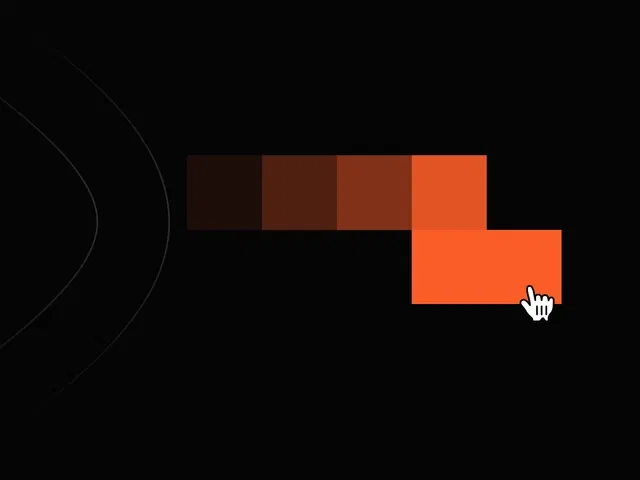
Real-time cursor tracking with multiple trailing elements (dots, circles, lines)
Smooth fade-out and easing for natural, organic trail motion
Customizable trail length, size, color, opacity, and speed
Responsive behavior that works flawlessly across desktop and touch devices
Lightweight implementation using Framer components, variants, and mouse position tracking
Narrated video with live canvas building, mouse move events, variant chaining, and real-time preview testing
#What is This Course?
"Cursor Trail Effect" is a free video tutorial on the Framer Marketplace, created by a creative designer/animator (community-featured contributor). This framer resource engaging, intermediate-level video walks through building a smooth, customizable cursor trail effect from scratch—where elegant dots, circles, or lines follow the mouse pointer with natural easing and fade away, adding a premium, interactive feel to any page. Delivered through narrated screen recordings with live component creation, zooms on mouse tracking setup, variants panel, easing curves, and real-time cursor movement testing, it covers trail element design, position following, fade animation, trail length control, and performance optimization. Video length is likely 10–18 minutes (typical for Marketplace micro-interaction tutorials), with pause-friendly pacing for hands-on replication. No duplicatable project is explicitly noted in listings, but the tutorial is designed for direct building in your own Framer canvas. It’s especially valuable for designer-developers who want subtle yet noticeable interactivity—turning ordinary cursors into delightful micro-experiences that make sites feel more alive and modern.
#What You’ll Learn ⚡
Creating a reusable trail element component (circle/dot/line) with fade-out animation
Tracking mouse position in Framer and linking it to multiple trail instances
Using variants and interactions to animate trail elements (scale down, opacity fade) over time
Chaining multiple trail particles with staggered delays for smooth, flowing motion
Customizing trail length, color, size, speed, and easing for brand-aligned polish
Optimizing for performance and touch devices (mouse → touch fallback)
#Who Is This For?
This video tutorial is perfect for Framer users who want to add personality and premium feel through micro-interactions—ideal if your site feels static or you want that extra layer of delight.
Skill Level: Intermediate—assumes comfort with components, variants, and interactions
Prior Knowledge Needed: Basic Framer mouse events, variants, animation timeline or interactions
Use Case 1: Creative agency portfolios, designer showcases, or experimental landing pages
Use Case 2: SaaS product heroes, app marketing sites, or any page wanting playful interactivity
Pain Point Solved: Default cursor feels boring—add elegant trailing animation for instant wow
Pain Point Solved: Cursor effects look janky—learn smooth easing and particle staggering
Bonus Fit: Designers inspired by modern web trends (cursor trails, particle effects) wanting Framer-native implementation
#Course Structure Breakdown
This video tutorial flows as a live, narrated build-along—screen recording with canvas zooms, mouse event setup, variants panel focus, animation chaining, and real-time cursor testing for easy pausing/replication.
Intro / Recap / Problem Statement: Hooks with the addictive appeal of smooth cursor trails, explains why they elevate UX, and outlines the no-code Framer approach
Main Demo Sections: Build trail particle component (circle/dot), set up fade-out animation on creation
Key Live Examples or Walkthroughs: Track mouse position, spawn multiple trail instances with delay, chain variants for scale/opacity fade, tune easing and timing
Tips / Best Practices: Stagger spawn timing for flow, limit particle count for performance, make touch-friendly, test across devices, customize colors/sizes
Wrap-up / Encouragement: Shows final cursor trail in full-page action, celebrates the premium interactive feel, and encourages playing with variations
Frequently Asked Questions
Does this require custom code overrides?
Minimal to none—tutorial uses native Framer mouse tracking, variants, and interactions; may include light code for spawn logic if needed, explained clearly.
How do I make the trail follow smoothly without lag?
Use Framer’s mouse position + variant transitions with short delays; video shows optimal easing and particle count for buttery performance.
Can I make the trail change color or shape?
Yes—use variants or variables for color/size; tutorial likely demos customization options (gradient trails, different shapes).
Cursor Trail Effect
Add a mesmerizing, smooth cursor trail animation
Resource Types :
Featured Framer Resources
Add Featured Product



Have a product?
Submit your Framer product to AllFramer, get featured, and drive genuine traffic while showcasing your work to the world. Turn your creativity into revenue and begin selling today! 🚀
Submit Resource





