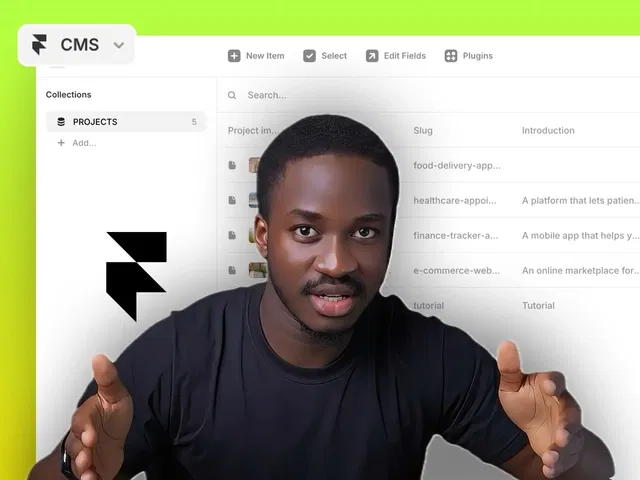
40-minute focused masterclass — ideal length for beginners to complete in one sitting
100% no-code — everything via Framer's CMS interface, bindings, and components
Hands-on and visual — live demos show every step, perfect for replicating
Duplicatable project likely included for active learning
Emphasizes real-world use: blogs, portfolios, dynamic lists
Beginner-friendly: starts from zero CMS knowledge
Motivational tone: builds confidence to make sites "more flexible and scalable"
#What is This Video Course?
"CMS Beginner Course" is a comprehensive, beginner-focused video framer resource (or video course) created by Chinonso Umeh on the Framer Marketplace. Presented as a single, structured video session (approximately 40 minutes long, as highlighted in the description), it provides a complete masterclass on understanding and using Framer's CMS (Content Management System) from the ground up. Through live screen recording, voiceover explanations, and hands-on demos, Chinonso walks viewers through setting up, managing, and displaying dynamic content in Framer — making websites more flexible, scalable, and easy to update without redesigning layouts. It includes practical examples, step-by-step builds, and likely a duplicatable project or starter template so learners can follow along and apply concepts immediately. The core promise: "Master Framer's CMS in 40 minutes" — turning static sites into dynamic, content-driven ones with confidence.
#What You’ll Learn ⚡
What Framer CMS is and why it matters: turning static pages into dynamic, editable ones for blogs, portfolios, product lists, testimonials, etc.
Creating and structuring CMS Collections: setting up fields (text, rich text, images, dates, references, etc.) and understanding field types
Adding and managing content: entering items manually, organizing data, using slugs/IDs for unique pages
Connecting CMS to your design: binding collections to components (CMS List, CMS Item, dynamic text/images) for automatic population
Building dynamic layouts: creating blog post templates, category filters, featured items, or paginated lists
Using CMS variables and bindings: displaying content conditionally, linking to detail pages, and handling rich text formatting
Best practices for scalability: clean naming, reusable components, performance tips, and avoiding common beginner errors
Hands-on project walkthrough: building a real example (e.g., blog, portfolio showcase, or product catalog) from collection setup to live display
#Who Is This For?
Absolute beginners to Framer CMS who have built static sites but want to add dynamic content (blogs, portfolios, news, products)
New Framer users remixing templates with CMS elements but unsure how collections, bindings, or dynamic pages work
Designers/creators transitioning from static designs to content-driven sites (e.g., personal blogs, agency case studies, small business listings)
Learners who prefer video format with live demos over reading long text tutorials
Anyone following the "How to Use Framer Templates" series or Chinonso Umeh’s content wanting a focused CMS deep dive
Visual + practical learners who want to see every click and decision in real time while building
#Course Structure Breakdown
Introduction & Why CMS — Welcome, overview of Framer CMS benefits (flexibility, scalability, easy updates), and quick preview of what the 40-minute course covers.
CMS Fundamentals — Explanation of CMS basics: what collections are, field types (text, media, rich text, etc.), and creating your first collection.
Content Management — Adding/editing items, organizing data, using slugs for URLs, and bulk actions.
Connecting CMS to Design — Binding collections to canvas: CMS List component, dynamic text/images, linking to detail pages.
Building Dynamic Pages — Creating templates for individual items (e.g., blog post layout), using CMS variables for content display.
Advanced Basics — Filters, sorting, featured items, conditional visibility, rich text formatting, and simple pagination.
Hands-On Project Build — Live walkthrough of a complete example (likely a blog or portfolio) — from collection setup to final dynamic display.
Tips, Best Practices & Wrap-up — Common pitfalls, performance notes, scalability advice, encouragement to experiment, and next steps (e.g., combining with animations or forms).
Follow-Along Resources — Duplicatable project or starter template linked for pausing and replicating the build.
Frequently Asked Questions
Is this a single video or multi-part series?
It's presented as one cohesive 40-minute video course — a single session masterclass, not broken into episodes.
Do I need prior Framer experience?
Basic Framer knowledge (canvas, components, breakpoints) is helpful but not required; starts from CMS fundamentals.
Is there a project to duplicate?
Yes — the tutorial includes an "Open project" link (common in Framer Marketplace videos) so you can follow along and practice.
CMS Beginner Course
Set up collections, bind dynamic content, build scalable sites
Resource Types :

Have a product?
Submit your Framer product to AllFramer, get featured, and drive genuine traffic while showcasing your work to the world. Turn your creativity into revenue and begin selling today! 🚀
Submit Resource





