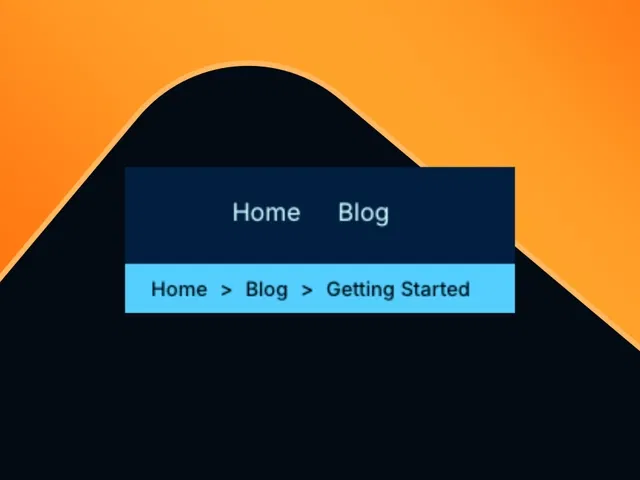
Ready-to-use SC Breadcrumb component (free from Marketplace) with auto-generated paths
Dynamic linking based on current page URL or CMS hierarchy (supports blog posts, categories, etc.)
Fully customizable styling (typography, separators, colors, hover states) via variants
Responsive design that collapses or adapts gracefully on mobile
Easy placement in headers, CMS templates, or any section
Narrated video demo with live canvas import, configuration, and styling walkthrough
#What is This Course?
"Adding Breadcrumb" is a free video tutorial on the Framer Marketplace, created by (or featuring) Abdullah Kahvecioğlu, the Turkish designer/builder behind the free SC Breadcrumb component. This framer resource practical video shows just how fast and easy it is to add professional breadcrumbs to any Framer site. Through narrated screen recordings with live component import, canvas placement, property configuration, and styling tweaks, it covers installing SC Breadcrumb, linking it to your site structure (static pages or CMS), customizing appearance (separators, colors, font), and testing across devices. Video length is likely 5–15 minutes (short and focused, typical for Marketplace component tutorials), with pause-friendly pacing for following along. No duplicatable project is explicitly noted in listings, but the tutorial encourages immediate use of the free component in your own Framer project. It's especially valuable for multi-page sites, CMS blogs, e-commerce, or portfolios—adding clear navigation context that boosts UX, reduces bounce rates, and signals site structure to search engines.
#What You’ll Learn ⚡
Installing and adding the free SC Breadcrumb component from the Framer Marketplace
Configuring the component to automatically read and display the current page path (or CMS hierarchy)
Customizing breadcrumb appearance (separator style, text color, hover effects, typography) using variants and properties
Placing breadcrumbs consistently (header, post template, category pages) with responsive behavior
Testing breadcrumb links, active state highlighting, and mobile collapsing/ellipsis
#Who Is This For?
This video tutorial is perfect for Framer users building multi-page or CMS-driven sites—ideal if your navigation feels incomplete or visitors get lost deep in your content.
Skill Level: Beginner to intermediate—great even with basic Framer knowledge
Prior Knowledge Needed: Comfort adding components and editing properties; CMS experience helpful for blog use
Use Case 1: Adding breadcrumbs to CMS blog posts, categories, or portfolio case studies
Use Case 2: Improving navigation in multi-page sites, documentation, or e-commerce category trees
Pain Point Solved: No native breadcrumbs in Framer—use SC Breadcrumb for instant, dynamic trails
Pain Point Solved: Generic or missing navigation cues—add clear, clickable paths that feel professional
Bonus Fit: Designers wanting SEO-friendly structure and better user orientation without custom code
#Course Structure Breakdown
This video tutorial flows as a short, focused build-along—narrated screen recording with canvas zooms, component properties panel walkthrough, and live preview testing for easy pausing/replication.
Intro / Recap / Problem Statement: Opens with why breadcrumbs matter (orientation, UX, SEO), introduces the free SC Breadcrumb component by Abdullah Kahvecioğlu, promises an easy setup
Main Demo Sections: Install SC Breadcrumb from Marketplace, add to page or CMS template, configure path source (auto-detect or manual)
Key Live Examples or Walkthroughs: Customize styling (separators, colors, typography, hover), set active/current item highlight, test on different page levels
Tips / Best Practices: Make responsive (collapse on mobile), ensure links work, match brand design, use in CMS dynamic pages for blog/category trails
Wrap-up / Encouragement: Shows final breadcrumb working across pages, highlights navigation/SEO wins, and encourages adding to your own site
Frequently Asked Questions
Is SC Breadcrumb completely free to use?
Yes—free component from Abdullah Kahvecioğlu on Marketplace; no subscription or hidden costs (check creator notes for any usage license).
Does it work automatically with CMS pages?
Yes—can read URL or CMS fields (slug, parent category) to build the trail dynamically; tutorial shows CMS blog setup.
Can I change the separator (e.g., > to / or chevron)?
Absolutely—customize via variants or text overrides; video demos common options like arrows, slashes, chevrons.
Adding Breadcrumb
Add clean, dynamic breadcrumbs to your Framer site in minutes
Resource Types :
Featured Framer Resources
Add Featured Product



Have a product?
Submit your Framer product to AllFramer, get featured, and drive genuine traffic while showcasing your work to the world. Turn your creativity into revenue and begin selling today! 🚀
Submit Resource





