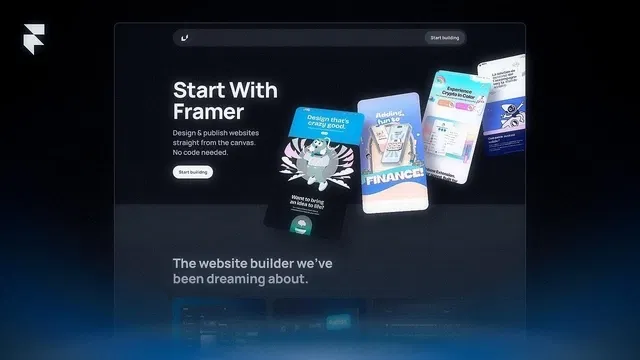
True from-scratch build — no pre-made templates, teaches core Framer concepts deeply
No-code throughout — everything via visual canvas, Stacks, properties panel, breakpoints
Duplicatable project or blank canvas encouraged for active learning
Focus on fundamentals: hierarchy (Stacks/Frames), responsiveness, clean organization
Results in a complete, publishable simple site (hero, nav, content, footer)
Nandi's clear, encouraging style — perfect pace for beginners
Builds confidence: "You can now create any site from empty canvas"
#What is This Video Course?
"A Site From Scratch" is a beginner-friendly video framer resource created by Nandi on the Framer Marketplace (part of the Framer University series). This hands-on video guides viewers through building their very first complete Framer website from an empty canvas — no templates, no code, just pure no-code Framer tools. With live screen recording, clear voiceover, and step-by-step building (estimated 15–30 minutes based on similar Nandi videos), it covers setting up structure, adding sections, styling, navigation, responsiveness, and publishing. It includes a duplicatable starter project (or blank canvas follow-along) so you can build simultaneously. The goal: give absolute beginners confidence to create and launch a simple yet stunning site end-to-end, learning Framer fundamentals along the way.
#What You’ll Learn ⚡
Starting from a blank canvas: setting up your Framer project, understanding the interface, and planning basic site structure
Building core sections: hero/header, features/content blocks, about, contact form, footer — using Stacks, Frames, text, images, and components
Adding navigation: creating a responsive navbar (desktop + mobile hamburger menu) with links and smooth page transitions
Styling with Framer tools: colors, typography, spacing, shadows, gradients, and responsive adjustments across breakpoints
Making it responsive: using auto-layout/Stacks, breakpoints (desktop/tablet/mobile), and mobile-specific tweaks for perfect adaptation
Basic interactions & polish: simple buttons, hover states, and optional light animations without overcomplicating
Publishing your site: one-click publish to a free Framer domain and tips for custom domains later
Core Framer workflow habits: layer organization, naming, duplicating for safety, testing on devices
#Who Is This For?
Complete Framer beginners who have never built a full site and feel overwhelmed starting from scratch
New users who want to learn Framer fundamentals without relying on templates (understand "how it works under the hood")
Aspiring designers or makers wanting to create their first portfolio, personal site, landing page, or simple business page
Visual learners who prefer watching a full build-along video with real-time decisions and explanations
People inspired by Nandi’s other tutorials (e.g., Animate Framer Sites) and ready to go from zero to a live site
Anyone tired of "just remix a template" advice and wanting to master building intentionally from empty canvas
#Course Structure Breakdown
Introduction & Setup — Welcome, why build from scratch (learn Framer deeply), quick overview of what we'll create (simple stunning site), and starting a new blank project.
Planning & Structure — Sketching rough layout (hero, features, footer etc.), adding main Stacks/Frames for sections, setting global styles (colors, fonts).
Building the Hero/Header — Adding hero section: background, headline, subtext, button, image — using auto-layout for alignment/responsiveness.
Core Content Sections — Step-by-step creation of features/cards, about text block, contact form — duplicating elements, adding icons/images, applying consistent spacing.
Navigation & Responsiveness — Building navbar (links, logo, mobile hamburger), setting up page links, switching breakpoints to adjust mobile layout (stacking, hiding/showing elements).
Polish & Interactions — Adding hover effects on buttons/cards, basic scroll or appear animations if time, refining typography/spacing, testing mobile view.
Publishing & Wrap-up — One-click publish to free Framer domain, tips for custom domain/SEO basics, encouragement to iterate and personalize.
Follow-Along Project — Viewers duplicate the linked starter (or start blank) and build simultaneously — pause and catch up as needed.
Frequently Asked Questions
Is this video suitable for total beginners?
Yes — assumes zero prior Framer experience; starts from new project and explains every click.
Do I need to follow along with a project?
Highly recommended — duplicate the starter project (linked in tutorial) or start blank to build simultaneously.
How long is the video?
Exact duration not listed, but Nandi's similar build-along videos are typically 15–30 minutes — detailed yet paced well.

Have a product?
Submit your Framer product to AllFramer, get featured, and drive genuine traffic while showcasing your work to the world. Turn your creativity into revenue and begin selling today! 🚀
Submit Resource





