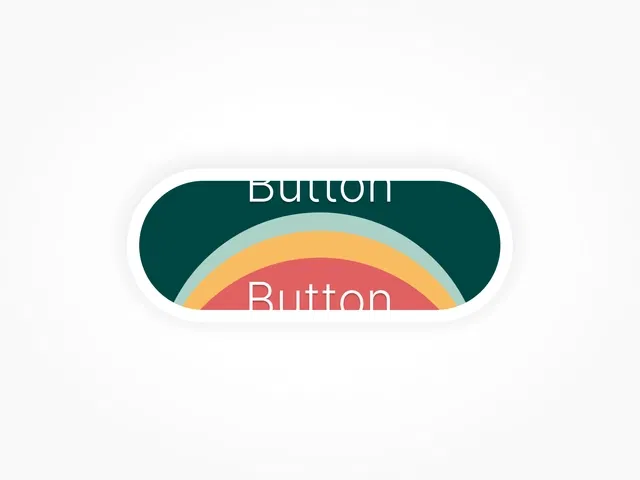
Unique wave animation on hover
Engaging micro-interaction for CTAs
Modern and visually dynamic design
Fully customizable colors and text
Easy to integrate into Framer projects
#What is Wave Button?
Wave Button is a Framer component that enhances standard call-to-action buttons with a smooth wave-style hover animation. Instead of static hover states, the button displays a fluid wave motion that flows across the surface, giving the interface a dynamic and modern feel.
This component works well for landing pages, SaaS websites, product announcements, and portfolios where designers want to add subtle motion and visual feedback to interactive elements. The wave animation improves user engagement while keeping the design clean and professional.
#Features ⚡
Wave Hover Animation: A fluid wave effect appears when users hover over the button.
Interactive Micro-Motion: Adds visual feedback and enhances user interaction.
Customizable Styling: Adjust colors, text, background, and layout.
Smooth Motion Effects: Carefully tuned animation timing for modern UI design.
Responsive Design: Works seamlessly across desktop, tablet, and mobile breakpoints.
Lightweight Implementation: Optimized for performance and smooth rendering.
Simple Setup: Drag-and-drop component ready to use in Framer.
#Included Components/Templates
The component package typically includes:
Wave button element
Animation effect configuration
Text and typography customization
Color and background styling options
Responsive layout compatibility
Everything is designed to run directly in Framer without additional setup.
#Pricing 💸
Available on the Framer Marketplace for free
Lifetime usage license after purchase
Pricing may vary depending on the creator
#Integrations 🧰
Framer layout and stack system
Landing page call-to-action sections
Product feature sections
Portfolio websites
Compatible with modern UI layouts
Frequently Asked Questions
What makes the Wave Button different from a regular button?
The component includes a fluid wave animation that appears during hover interactions.
Can I customize the wave color?
Yes, the colors and styling can typically be adjusted to match your brand.
Is the animation performance friendly?
Yes, it is designed to remain lightweight and smooth.
Have a product?
Submit your Framer product to AllFramer, get featured, and drive genuine traffic while showcasing your work to the world. Turn your creativity into revenue and begin selling today! 🚀
Submit Resource