100% free Framer component
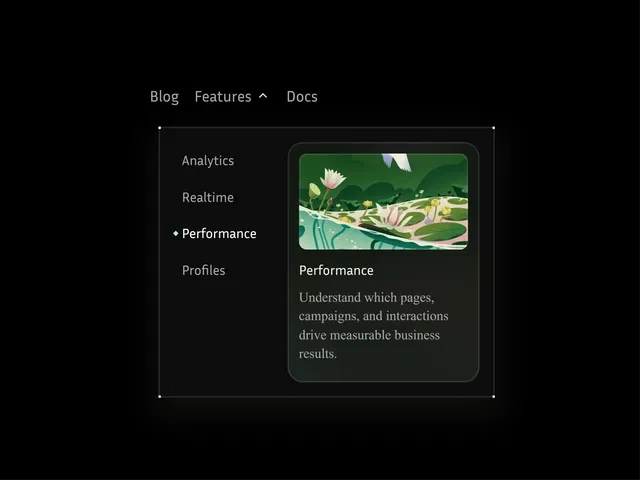
Multi-column mega navigation layout
Ideal for large content or product sites
Fully responsive and structured
Easy drag-and-drop customization
#What is Unique Drop Down?
Unique Drop Down is a free Framer component designed to help you build advanced, multi-column navigation menus without writing code. It’s perfect for SaaS platforms, marketplaces, documentation sites, agencies, and content-heavy websites that need structured navigation beyond simple dropdown menus. Built natively for Framer, it allows you to organize links, categories, featured items, and call-to-actions in a clean and scalable format, improving both usability and information architecture.
#Features ⚡
Multi-Column Layout: Display grouped navigation links in organized columns.
Structured Content Sections: Add headings, link lists, featured items, or promotional blocks.
Hover & Interaction Support: Smooth dropdown transitions for modern UX.
Responsive Behavior: Adapts elegantly across desktop, tablet, and mobile.
Customizable Styling: Easily edit spacing, typography, colors, and layout.
Reusable Component: Duplicate and adapt across multiple navigation areas.
No-Code Setup: Configure everything inside Framer’s visual editor.
#Included Components/Templates
Unique Drop Down includes:
Configurable mega menu container
Multi-column layout structure
Editable link groups with headings
Optional featured content or CTA section
Animation and interaction controls
Demo navigation setup
#Pricing 💸
Unique Drop Down is completely free on the Framer Marketplace.
Free to duplicate into your project
No purchase required
Requires a Framer site plan for publishing
#Integrations 🧰
Unique Drop Down works seamlessly with:
Framer visual editor
SaaS landing pages and marketing sites
Documentation and resource libraries
Marketplace or directory-style websites
Custom domains via Framer hosting
Frequently Asked Questions
Is Mega Drop Down really free?
Yes. You can duplicate it from the Framer Marketplace at no cost.
When should I use a mega menu instead of a regular dropdown?
Use it when you have multiple categories, grouped links, or featured content that needs better organization.
Is it mobile responsive?
Yes. The layout adjusts properly for smaller screens.
Unique Menu DropDown
Create powerful multi-column menus for free
Resource Types :

Have a product?
Submit your Framer product to AllFramer, get featured, and drive genuine traffic while showcasing your work to the world. Turn your creativity into revenue and begin selling today! 🚀
Submit Resource