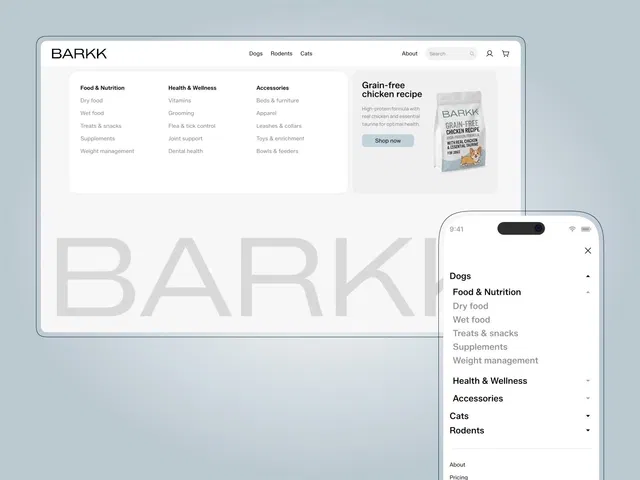
Multi-column dropdown navigation
Ideal for SaaS, marketplaces, and large sites
Fully responsive with mobile support
Clean animations and hover interactions
Built natively for Framer
#What is Mega Menu?
Mega Menu is a professional-grade Framer navigation component designed for websites that need structured, multi-level menus. Instead of simple dropdowns, it enables wide, content-rich navigation panels with multiple columns, icons, featured links, CTAs, and grouped sections. It’s ideal for SaaS platforms, product directories, agencies, documentation sites, and marketplaces that need scalable navigation without building complex interactions from scratch. Built specifically for Framer, it integrates seamlessly with layouts, breakpoints, and motion controls.
#Features ⚡
Multi-Column Layout: Organize links into structured categories with visual clarity.
Hover & Click Interactions: Smooth dropdown animations with intuitive behavior.
Responsive Navigation: Converts elegantly into mobile-friendly menus.
Customizable Styling: Adjust spacing, typography, icons, and backgrounds.
CTA & Featured Blocks: Highlight key pages, promotions, or new launches.
Nested Menu Support: Group links logically for better UX.
Performance Optimized: Clean structure to avoid unnecessary layout shifts.
#Included Components
The package typically includes:
Main navigation bar
Mega dropdown container
Multi-column layout structure
Featured link/CTA block
Mobile navigation version
Animation and hover controls
Everything is structured for plug-and-play usage inside your Framer project.
#Pricing 💸
Absolutely free
Lifetime usage license
Creator-provided updates included (per marketplace terms)
Check the official listing for current pricing and license details.
#Integrations 🧰
Framer native layout system
Framer breakpoints & responsive controls
Framer motion & interaction settings
Works with CMS-driven navigation structures
Compatible with existing Framer templates
Frequently Asked Questions
When should I use a mega menu instead of a simple dropdown?
Use a mega menu when you have multiple categories, products, or resources that need structured navigation.
Does it support mobile devices?
Yes. It adapts into a mobile-friendly menu layout automatically.
Can I add icons and images inside the menu?
Yes. You can include icons, visuals, and featured sections within the dropdown area.
Mega Menu
Advanced multi-column navigation component
Resource Types :

Have a product?
Submit your Framer product to AllFramer, get featured, and drive genuine traffic while showcasing your work to the world. Turn your creativity into revenue and begin selling today! 🚀
Submit Resource





